
Access to the Keyvision mobile app is managed through your building or project’s member registration process. You may need to register for an account, wait for approval, or contact your building management team if your access has not yet been activated.
Step 1: Download the Keyvision Mobile App
Visit the Keyvision app pages on the App Store or Google Play Store, then select the building or project to download the correct app.
Note: You can also confirm with your building manager if your building is using a custom project app or the generic Keyvision app.
Step 2: Register for Access
If you do not already have an account, select the option to register or create an account.
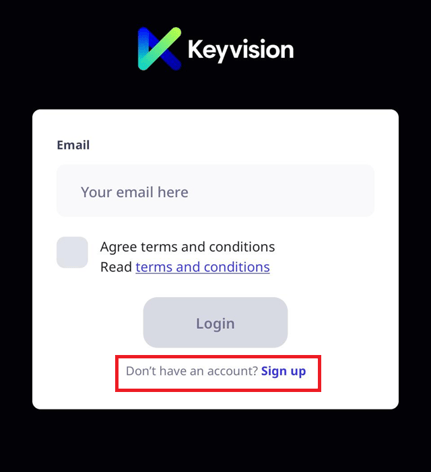
You may be asked to provide details such as:
Your name
Email address
Mobile number
Apartment, tenancy, company, or lot details
Building or project name
Please ensure your details are entered correctly, as these may be used by the building management team to verify your access.
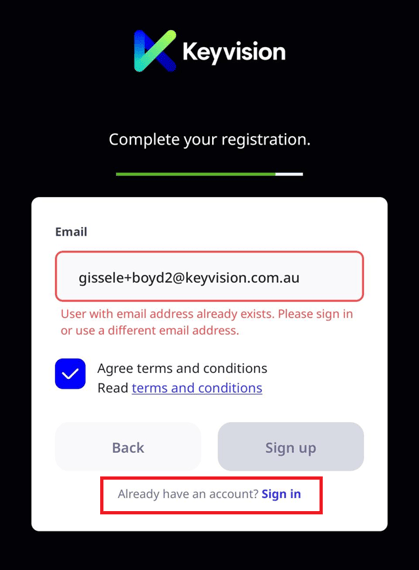
Note: If you see the message below, your email address may already be registered in the platform. In this case, please sign in using your existing account details.
Step 3: Verify Your Email Address
After registering, you may receive a verification email.
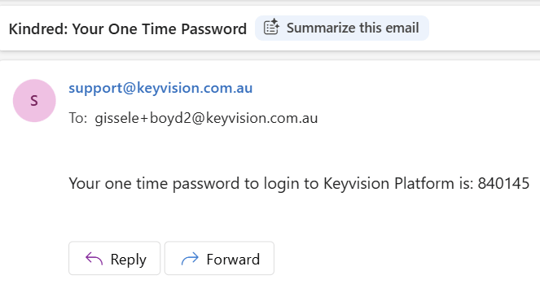
Open the email to retrieve the verification code to enter on the mobile app.
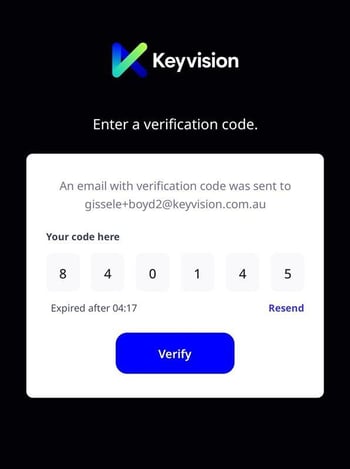
If you do not receive the email, please check your junk, spam, or promotions folder. You may also need to confirm that your email address was entered correctly.
Step 4: Wait for Approval
Some buildings require new registrations to be reviewed and approved before access is granted.
If approval is required, your registration will be reviewed by the relevant building management or concierge team.
You will be notified via email once your access has been approved.
Step 5: Log In to the App
Once your registration has been approved, return to the Keyvision mobile app and sign in using your registered email address and the verification code sent to your email.
After logging in, you should be able to access the available features for your building or project.
What to Do If You Cannot Access the App
If you are unable to log in or cannot access the correct building, please check the following:
-
Your email address was entered correctly
-
You have completed email verification
-
Your registration has been approved
-
You are using the correct building or project in the app
-
Your app is updated to the latest version
If you are still unable to access the app, please contact your building management team or concierge for assistance.
You may also contact Keyvision Support at support@keyvision.com.au or on (02) 7804 4080.