---
title: Manage Your Notification Preferences
description: Learn how to manage push and SMS notification preferences in the mobile app and choose which updates you would like to receive.
---
[Skip to content](https://knowledge.keyvision.com.au/manage-your-notification-preferences#main-content)
English - Australia
Show submenu for translations

Open main navigation
Close main navigation
- English - Australia
Show submenu for translations
- Contact us
Contact us
How can we help you?
- There are no suggestions because the search field is empty.
1. [Keyvision](https://knowledge.keyvision.com.au/?hsLang=en-au)
2. [Communication Management](https://knowledge.keyvision.com.au/communication-management?hsLang=en-au)
24 July 2026
# Manage Your Notification Preferences
Choose how you receive updates from the mobile app by managing your push and SMS notification preferences.
Access your notification settings
1\. From the **Home** screen, tap the **Settings** icon beside your profile.
.png?width=179&height=400&name=image(66).png)
2\. Select **Notifications & Privacy**.
.png?width=179&height=400&name=image(67).png)
3\. Choose **Push Notifications** or **SMS Notifications**.
.png?width=179&height=399&name=image(68).png)
**Manage push notifications**
Select **Push Notifications**, then use the **Get push notifications** switch to enable or disable all push notifications.
When push notifications are enabled, you can customise the types of updates you receive, including:
- Bookings
- Event calendar RSVPs
- Groups & Clubs
- Help desk
- Keys & FOB Orders
- Newsfeed
- Online forms
- Parcels & Deliveries
- Special Offers
- Surveys & Polls
Use the switch beside each category to enable or disable its notifications.
**Manage SMS notifications **
Select **SMS Notifications**, then use the **Get SMS notifications** switch to enable or disable SMS updates.
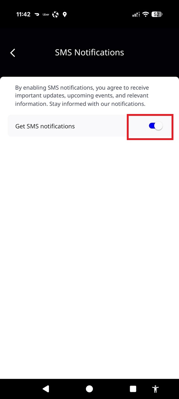
Your changes are applied automatically.
- [Communication Management](https://knowledge.keyvision.com.au/communication-management?hsLang=en-au#main-content)
- [Categories](https://knowledge.keyvision.com.au/communication-management?hsLang=en-au#categories)
- [Emails](https://knowledge.keyvision.com.au/communication-management?hsLang=en-au#emails)
- [Newsfeed](https://knowledge.keyvision.com.au/communication-management?hsLang=en-au#newsfeed)
- [Online Forms](https://knowledge.keyvision.com.au/communication-management?hsLang=en-au#online-forms)
- [Member Management](https://knowledge.keyvision.com.au/member-management?hsLang=en-au#main-content)
- [Help Desk](https://knowledge.keyvision.com.au/member-management?hsLang=en-au#help-desk)
- [Member Registrations](https://knowledge.keyvision.com.au/member-management?hsLang=en-au#member-registrations)
- [Parcels & Deliveries](https://knowledge.keyvision.com.au/member-management?hsLang=en-au#parcels-deliveries)
- [Place Management](https://knowledge.keyvision.com.au/place-management?hsLang=en-au#main-content)
- [Building Keys](https://knowledge.keyvision.com.au/place-management?hsLang=en-au#building-keys)
- [Contractors](https://knowledge.keyvision.com.au/place-management?hsLang=en-au#contractors)
- [Keys & Fobs](https://knowledge.keyvision.com.au/place-management?hsLang=en-au#keys-fobs)
- [Work Orders](https://knowledge.keyvision.com.au/place-management?hsLang=en-au#work-orders)
- [Place Activation](https://knowledge.keyvision.com.au/place-activation?hsLang=en-au#main-content)
- [Event Calendar](https://knowledge.keyvision.com.au/place-activation?hsLang=en-au#event-calendar)
- [Management Access, Settings & Permissions](https://knowledge.keyvision.com.au/management-access-settings-permissions?hsLang=en-au)
- [Release Notes](https://knowledge.keyvision.com.au/release-notes?hsLang=en-au#main-content)
- [2026](https://knowledge.keyvision.com.au/release-notes?hsLang=en-au#2026)
- [Dashboard Access](https://knowledge.keyvision.com.au/dashboard-access?hsLang=en-au)
- [Essentials](https://knowledge.keyvision.com.au/essentials?hsLang=en-au#main-content)
- [How To's](https://knowledge.keyvision.com.au/essentials?hsLang=en-au#how-tos)
[](https://keyvision.com.au/?hsLang=en-au)
[mailto:email@email.com](mailto:email@email.com)
Copyright © 2026, Keyvision